25.10.16 개발일지
[C# 개인 프로젝트 게임 만들기]
로그인창 따로 분리

: 게임 시작 화면(로그인창 분리)을 따로 만들었다.
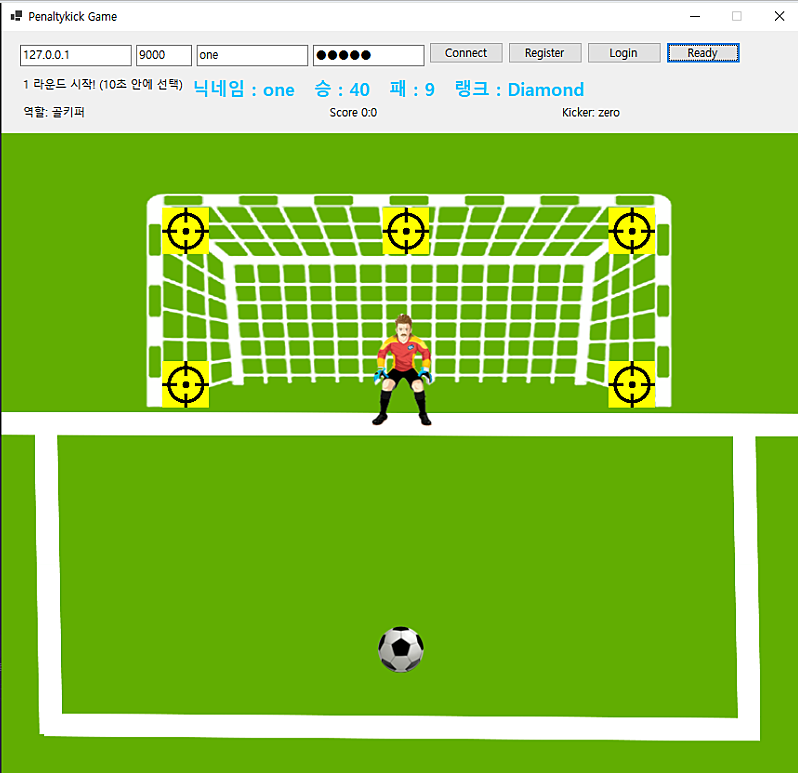
: 기존에 로그인창이 메인 게임 화면에 통합되어 있었는데 로그인창과 메인 게임창을 분리시켰다.

: 기존에는 Form1에서 모든창을 다 다뤘었지만
StartForm을 따로 만들어서 로그인창을 분리시켰다.
using Penaltykick_Game;
using System;
using System.Drawing;
using System.Threading.Tasks;
using System.Windows.Forms;

namespace Penaltykick_Game
{
    public partial class StartForm : Form
    {
        private Label lblTitle;
        private TextBox txtID;
        private TextBox txtPW;
        private Button btnLogin;
        private Button btnRegister;
        private Label lblStatus;
        private Label lblRole;
        private Label lblScore;
        private Label lblRound;
        private NetClient net = new NetClient();

        public StartForm()
        {
            InitUI();
            this.Load += StartForm_Load;

            net.OnLine += OnLine;
        }

        private void InitUI()
        {
            // 창 기본 세팅
            this.Text = "Penalty Kick Game - Start";
            this.ClientSize = new Size(860, 800);
            this.FormBorderStyle = FormBorderStyle.FixedSingle;
            this.MaximizeBox = false;
            this.StartPosition = FormStartPosition.CenterScreen;
            this.BackgroundImage = Properties.Resources.start_bg;
            this.BackgroundImageLayout = ImageLayout.Stretch;
            this.BackgroundImageLayout = ImageLayout.Stretch;

            // ID 입력
            txtID = new TextBox();
            txtID.PlaceholderText = "ID";
            txtID.Font = new Font("Segoe UI", 12F);
            txtID.Location = new Point(280, 520);
            txtID.Width = 300;
            this.Controls.Add(txtID);

            // PW 입력
            txtPW = new TextBox();
            txtPW.PlaceholderText = "Password";
            txtPW.Font = new Font("Segoe UI", 12F);
            txtPW.PasswordChar = '●';
            txtPW.Location = new Point(280, 560);
            txtPW.Width = 300;
            this.Controls.Add(txtPW);

            // 로그인 버튼
            btnLogin = new Button();
            btnLogin.Text = "Login";
            btnLogin.Font = new Font("Segoe UI", 12F, FontStyle.Bold);
            btnLogin.Location = new Point(280, 610);
            btnLogin.Size = new Size(140, 40);
            btnLogin.Click += BtnLogin_Click;
            this.Controls.Add(btnLogin);

            // 회원가입 버튼
            btnRegister = new Button();
            btnRegister.Text = "Register";
            btnRegister.Font = new Font("Segoe UI", 12F, FontStyle.Bold);
            btnRegister.Location = new Point(440, 610);
            btnRegister.Size = new Size(140, 40);
            btnRegister.Click += BtnRegister_Click;
            this.Controls.Add(btnRegister);

            // 상태 라벨
            lblStatus = new Label();
            lblStatus.Text = "서버에 연결 중...";
            lblStatus.Font = new Font("Segoe UI", 14F, FontStyle.Bold);
            lblStatus.ForeColor = Color.White;
            lblStatus.BackColor = Color.Transparent;
            lblStatus.AutoSize = true;
            lblStatus.Location = new Point(280, 680);
            this.Controls.Add(lblStatus);

            lblRole = new Label()
            {
                Left = 20,
                Top = 80,
                Width = 200,
                Text = "역할: -",
                Font = new Font("Segoe UI", 14F, FontStyle.Bold)
            };

            lblScore = new Label()
            {
                Left = 350,
                Top = 80,
                Width = 200,
                Text = "Score 0:0",
                Font = new Font("Segoe UI", 14F, FontStyle.Bold)
            };

            lblRound = new Label()
            {
                Left = 600,
                Top = 80,
                Width = 250,
                Text = "Round 0",
                Font = new Font("Segoe UI", 14F, FontStyle.Bold)
            };
        }

        private async void StartForm_Load(object sender, EventArgs e)
        {
            bool connected = await net.Connect("127.0.0.1", 9000);
            lblStatus.Text = connected ? "✅ 서버 연결 완료!" : "❌ 서버 연결 실패";
        }

        private async void BtnLogin_Click(object sender, EventArgs e)
        {
            string id = txtID.Text.Trim();
            string pw = txtPW.Text.Trim();
            await net.Send($"LOGIN {id} {pw}");
        }

        private async void BtnRegister_Click(object sender, EventArgs e)
        {
            string id = txtID.Text.Trim();
            string pw = txtPW.Text.Trim();
            await net.Send($"REGISTER {id} {pw}");
        }
public void OpenGameForm(string username, string wins, string losses, string rank)
{
Form1 game = new Form1(net, username, wins, losses, rank);
game.StartPosition = FormStartPosition.Manual;
game.Location = this.Location;
game.Size = this.Size;
this.Hide();
game.ShowDialog();
this.Close();
}
private void OnLine(string line)
{
this.BeginInvoke(new Action(() => HandleServerMessage(line)));
}
private void HandleServerMessage(string line)
{
if (line.StartsWith("LOGIN_OK"))
{
string[] parts = line.Split(' ', StringSplitOptions.RemoveEmptyEntries);
string username = parts[1];
string wins = parts[2];
string losses = parts[3];
string rank = parts[4];
this.Invoke((MethodInvoker)(() =>
{
OpenGameForm(username, wins, losses, rank);
}));
}
else if (line == "LOGIN_FAIL")
{
lblStatus.Text = "로그인 실패. 다시 시도하세요.";
}
else if (line == "REGISTER_OK")
{
lblStatus.Text = "회원가입 성공!";
}
else if (line == "REGISTER_FAIL")
{
lblStatus.Text = "회원가입 실패. 이미 존재하는 ID일 수 있습니다.";
}
}
}
}: 서버연결, 로그인 관련 버튼과 이와 관련된 모든 함수들 StartForm으로 이동시켰다.
원래 한곳에 다 있던 코드들을 두 군데로 나누다 보니 어디에 넣었는지 헷갈려서 힘들었다..
메인 게임창 ui 수정

: 서버연결, 로그인 관련 버튼들 다 없애서 다른 글씨들과 레디 버튼이 더 잘보이도록 ui를 수정했다.
public Form1(NetClient netClient, string username, string wins, string losses, string rank)
{
    InitializeComponent();
    net = netClient;
    net.OnLine += OnLine;

    _username = username;
    _wins = wins;
    _losses = losses;
    _rank = rank;
    currentRank = rank;

    lblStatus.Text = "로그인 완료";
    lblStatus.Font = new Font("맑은 고딕", 14F, FontStyle.Bold);  // 글씨 키우기 & Bold
    lblStatus.ForeColor = Color.Black;                            // 색상 변경 (원하는 색으로)

    lblRole.Font = new Font("Segoe UI", 14F, FontStyle.Bold);
    lblScore.Font = new Font("Segoe UI", 14F, FontStyle.Bold);
    lblRound.Font = new Font("Segoe UI", 14F, FontStyle.Bold);
    lblRole.ForeColor = Color.Black;
    lblScore.ForeColor = Color.Black;
    lblRound.ForeColor = Color.Black;


    goalTarget = new List<PictureBox> { topLeft, top, topRight, left, right };

    goalKeeper.Parent = goalBackground;
    football.Parent = goalBackground;
    foreach (var t in goalTarget) t.Parent = goalBackground;

    this.Load += Form1_Load;
    this.Resize += (s, e) => PositionElements();
    this.FormClosed += (s, e) => Application.Exit();

    this.FormBorderStyle = FormBorderStyle.FixedSingle;
    this.MaximizeBox = false;
    this.lblUserInfo = new Label();
    this.lblUserInfo.AutoSize = true;
    this.lblUserInfo.Font = new Font("맑은 고딕", 14F, FontStyle.Bold);
    this.lblUserInfo.Location = new Point(200, 15);
    this.lblUserInfo.Text = "";
    this.Controls.Add(this.lblUserInfo);

    UpdateUserInfoLabel();
    this.lblUserInfo.BringToFront();
    this.FormClosed += (s, e) => Application.Exit();
}
private void HandleServerMessage(string line)
{
// 디버그: 어떤 문자열을 받는지 항상 확인
//Console.WriteLine($"[CLIENT RECV] {line}");
if (line.StartsWith("LOGIN_OK"))
{
// 👇 여기는 그대로 둬도 됨. 단, ID/PW 입력 필드는 삭제되었으니 UI만 갱신.
string[] parts = line.Split(' ', StringSplitOptions.RemoveEmptyEntries);
if (parts.Length >= 5)
{
string username = parts[1];
string wins = parts[2];
string losses = parts[3];
string rank = parts[4];
currentRank = rank;
// 색상 + 텍스트 UI 업데이트만 남김
switch (rank)
{
case "Bronze": lblUserInfo.ForeColor = Color.SaddleBrown; break;
case "Silver": lblUserInfo.ForeColor = Color.DimGray; break;
case "Gold": lblUserInfo.ForeColor = Color.Gold; break;
case "Platinum": lblUserInfo.ForeColor = Color.MediumTurquoise; break;
case "Diamond": lblUserInfo.ForeColor = Color.DeepSkyBlue; break;
default: lblUserInfo.ForeColor = Color.White; break;
}
lblStatus.Text = "로그인 성공";
lblUserInfo.Text = $"닉네임 : {username} 승 : {wins} 패 : {losses} 랭크 : {rank}";
}
return;
}
랭크 시스템 구현

: 랭크에 따라 내정보의 색깔이 바뀌도록 했다.

: 게임이 종료됐을 때 랭크가 변경되면 랭크 변경 알림창이 뜨도록 했다.
else if (line.StartsWith("RECORD "))
{
    string[] parts = line.Split(' ', StringSplitOptions.RemoveEmptyEntries);
    if (parts.Length >= 5)
    {
        string username = parts[1];
        string wins = parts[2];
        string losses = parts[3];
        string rank = parts[4];

        string oldRank = !string.IsNullOrEmpty(currentRank) ? currentRank : _rank;
        bool rankChanged = oldRank != rank;

        currentRank = rank;

        // 색상 업데이트
        switch (rank)
        {
            case "Bronze": lblUserInfo.ForeColor = Color.SaddleBrown; break;
            case "Silver": lblUserInfo.ForeColor = Color.DimGray; break;
            case "Gold": lblUserInfo.ForeColor = Color.Gold; break;
            case "Platinum": lblUserInfo.ForeColor = Color.MediumTurquoise; break;
            case "Diamond": lblUserInfo.ForeColor = Color.DeepSkyBlue; break;
            default: lblUserInfo.ForeColor = Color.White; break;
        }

        lblUserInfo.Text = $"닉네임 : {username}   승 : {wins}   패 : {losses}   랭크 : {rank}";

        if (rankChanged && !string.IsNullOrEmpty(oldRank))
        {
            MessageBox.Show(
                $"랭크가 {oldRank} ➝ {currentRank}(으)로 변경되었습니다!",
                "랭크 변동",
                MessageBoxButtons.OK,
                MessageBoxIcon.Information
            );
        }
    }
'10월 개발일지' 카테고리의 다른 글
| 25.10.21 개발일지(C# 네트워크, 포트폴리오 작성) (0) | 2025.11.17 |
|---|---|
| 25.10.17 개발일지(C# 개인 프로젝트 게임 만들기) (0) | 2025.11.17 |
| 25.10.15 개발일지(C# 개인 프로젝트 게임 만들기) (0) | 2025.11.16 |
| 25.10.14 개발일지(C# 개인 프로젝트 게임 만들기) (0) | 2025.11.16 |
| 25.10.13 개발일지(이것이 C#이다 chapter 21, 22) (0) | 2025.11.16 |