25.10.15 개발일지
[C# 개인 프로젝트 게임 만들기]
게임 ui 수정
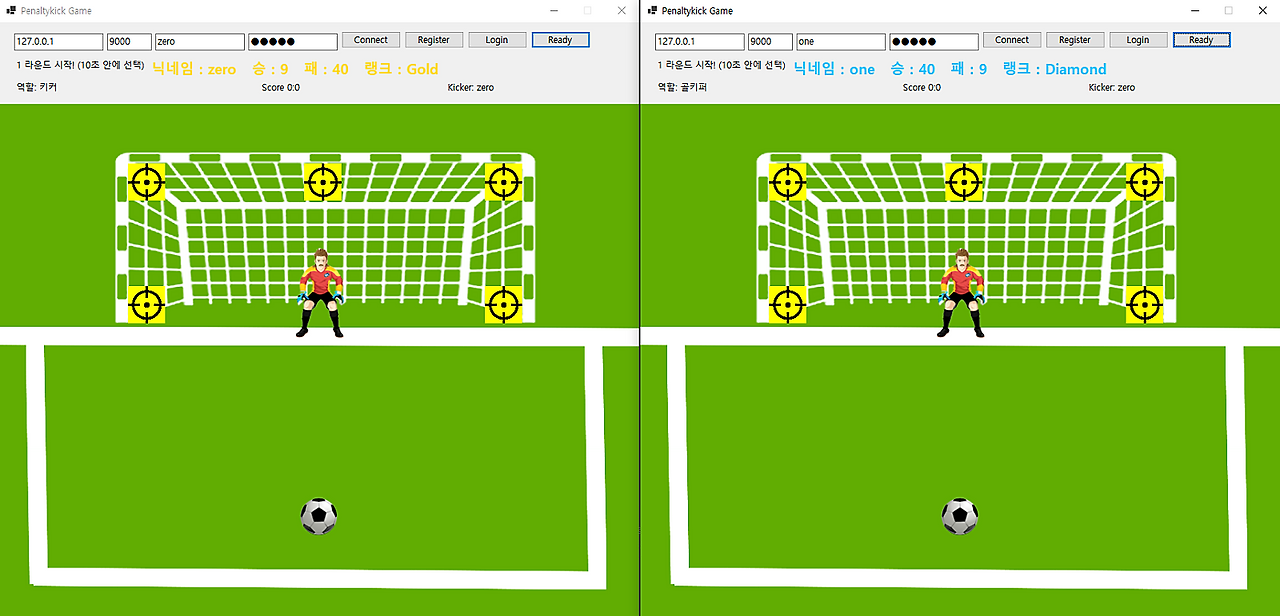
: 게임 시작 화면
로그인 하면 닉네임, 승, 패, 랭크가 표시되고 레디 버튼을 누르면 매칭이 시작된다.
두 명의 클라이언트가 랜덤으로 매칭되고 게임이 시작된다.

: ui 수정
전체 창 크기, 타겟 버튼 위치, 공과 골키퍼가 움직이는 위치를 수정해 게임화면이 자연스럽게 했다.
private void PositionElements()
{
    // 초록색 배경
    goalBackground.Width = 915;
    goalBackground.Height = 717;
    goalBackground.SizeMode = PictureBoxSizeMode.StretchImage;
    goalBackground.Left = (this.ClientSize.Width - goalBackground.Width) / 2;
    goalBackground.Top = 110;


    // 골키퍼
    goalKeeper.Width = 80;
    goalKeeper.Height = 130;
    goalKeeper.Location = new Point(
        (goalBackground.Width - goalKeeper.Width) / 2,
        190
    );

    // 축구공
    football.Width = 50;
    football.Height = 50;
    football.Location = new Point(
        (goalBackground.Width - football.Width) / 2,
        530
    );

    // 타겟
    topLeft.Location = new Point(200, 80);
    top.Location = new Point(437, 80);
    topRight.Location = new Point(680, 80);
    left.Location = new Point(200, 245);
    right.Location = new Point(680, 245);

    foreach (var t in goalTarget)
    {
        t.Width = 50;
        t.Height = 50;
        t.BackColor = Color.Yellow;
        t.SizeMode = PictureBoxSizeMode.StretchImage;
        t.BringToFront();
    }

    goalKeeper.BackColor = Color.Transparent;
    football.BackColor = Color.Transparent;

    goalKeeper.BringToFront();
    football.BringToFront();
}
타겟 버튼 문제 해결
라운드가 끝나고 다음 라운드로 넘어갈 때 한번씩 버튼이 안눌리는 오류가 발생해 수정했다.
else if (line.StartsWith("ROUND_START"))
{
    var parts = line.Split('|');
    int roundNum = int.Parse(parts[1].Split('=')[1]);
    lblStatus.Text = $"{roundNum} 라운드 시작! (10초 안에 선택)";

    // 1) 위치 리셋
    ResetPositions();

    // 2) UI 초기화 후
    InitializePositions();

    // 3) 타겟 활성화 (즉시)
    SetTargetsEnabledSafe(true);

    // 4) 안전장치 - 혹시 초기화 타이밍이 밀리는 경우 대비
    Task.Delay(1000).ContinueWith(_ =>
    {
        SetTargetsEnabledSafe(true);
    });
}
private void SetTargetsEnabledSafe(bool enabled)
{
if (InvokeRequired)
{
Invoke(new Action(() => SetTargetsEnabledSafe(enabled)));
return;
}
foreach (var t in goalTarget)
{
t.Enabled = enabled;
}
}
랭크 시스템 구현
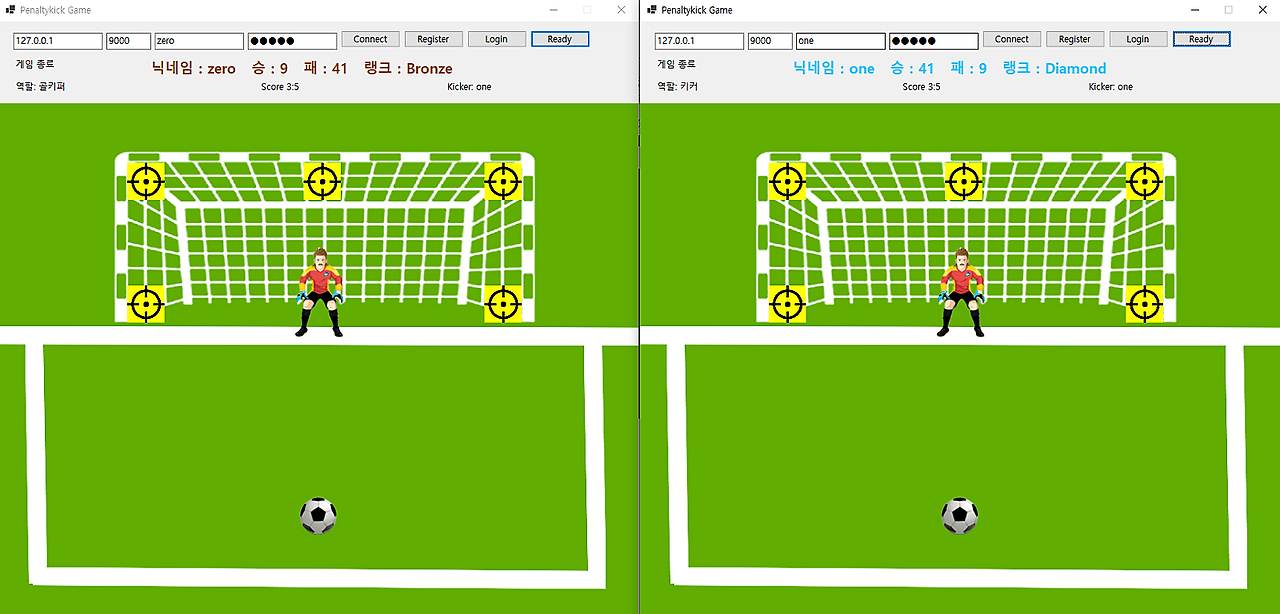
승률에 따라 랭크가 나뉘어지고 로그인 시 자신의 랭크가 뜨고 그 랭크에 맞게 정보창 색깔이 바뀐다.
internal static class RankCalculator
{
    public static string Calc(int wins, int games)
    {
        if (games == 0) return "Bronze";
        double wr = (double)wins / games;

        if (games >= 30 && wr >= 0.80) return "Diamond";
        if (games >= 20 && wr >= 0.70) return "Platinum";
        if (games >= 15 && wr >= 0.60) return "Gold";
        if (games >= 10 && wr >= 0.50) return "Silver";
        return "Bronze";
    }
}
switch (rank)
{
case "Bronze": lblUserInfo.ForeColor = Color.SaddleBrown; break;
case "Silver": lblUserInfo.ForeColor = Color.DimGray; break;
case "Gold": lblUserInfo.ForeColor = Color.Gold; break;
case "Platinum": lblUserInfo.ForeColor = Color.MediumTurquoise; break;
case "Diamond": lblUserInfo.ForeColor = Color.DeepSkyBlue; break;
default: lblUserInfo.ForeColor = Color.White; break;
}
lblUserInfo.Text = $"닉네임 : {username} 승 : {wins} 패 : {losses} 랭크 : {rank}";
: db에 승, 패, 랭크 등 저장
'10월 개발일지' 카테고리의 다른 글
| 25.10.17 개발일지(C# 개인 프로젝트 게임 만들기) (0) | 2025.11.17 |
|---|---|
| 25.10.16 개발일지(C# 개인 프로젝트 게임 만들기) (0) | 2025.11.17 |
| 25.10.14 개발일지(C# 개인 프로젝트 게임 만들기) (0) | 2025.11.16 |
| 25.10.13 개발일지(이것이 C#이다 chapter 21, 22) (0) | 2025.11.16 |
| 25.10.06 개발일지(이것이 C#이다 chapter 20) (0) | 2025.11.16 |